



I started this last night & it wasn't originally going
to include a photo of myself..but the muse thought it should.
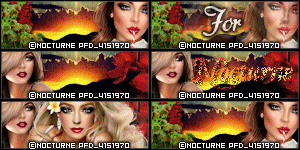
My fairy was right. Yup the beautiful lady in this tag
is myself. It was taken last August on a trip to
Vegas for a boudoir session. I was channeling my
inner goddess with this particular outfit.
Society tries its hardest to tear us women down.
It tries to make us feel like we are never good enough no
matter what we do. We don't have to listen ladies.
We can determine how we feel about ourselves.
And I am choosing to love myself. That while
I am not perfect, I am perfectly me. Our bodies
& our minds do a lot for us. Shouldn't we control
the narrative we tell ourselves? The scrap kit I used
is by Cutie Pie Scraps & is called Self-Love
Its such a pretty scrap
& perfect for designing with a self love them.


I love how well they fit together. The tube is done in greys & blacks with a POP of color on the Robin bird - which makes it really stand out.


Note this was written at request for a New tagger. To help her learn
how to use psp/scrapkit/forum style tags
This tutorial was written
by Sarah Fiack on
December 31,2013
Any resemblance to another
tutorial is purely coincidental.
For this tutorial, I’m using
a tube by Keith Garvey
You can purchase his tubes at
his store
Supplies:
Tube of choice
Scrap of choice.
I am using one called Happy New Year by
Amy Marie. It is also available
at her store.
Open a 600x250 new image.
Open up your tube & scrap
supplies of choice.
Select your magic wand tool.

Click on your new image.
Open a paper of choice.
Copy and paste the paper
as a new layer.
Selections - invert.

your keyboard.
Open a banner element.
Copy and paste as new layer.
Move to the bottom of the tag.

Move over so it covers
only half of the bottom
of the tag.
On your layer palette in your psp,
right click on this layer.
Duplicate once


This way it covers along the
bottom of the whole tag.
Select none.
Open a tube closeup.
Paste as a new layer.
Using your move tool,
position your tube where
you would like it on your tag.

Open a drink element.
Image -Menu tab
Resize 70%.

On your layer palette,
click the paper layer.
Copy and paste the drink
element as a new layer.
Select your move tool.
Move the drink to the left side
of the tag.
Open a cupcake element.
Image menu tab - resize 55%.
Copy and paste as a new layer.
Select your move tool again & move
the cupcake layer to the right
hand side of the tag.
Effects - 3D effects - drop shadow

Opacity 25 Blur 5.00
color Black. Make sure shadow
on new layer is not checked.

Apply the drop shadow to the
tube, cupcake and drink layers.
Merge layers visible.
Go to Layers menu - New
raster layer.

Blend Mode normal
Opacity 100 Link 0
Click Okay.

On your Materials palette, select
the top square with your mouse.
This is the stroke/foreground one.

Click on the square to bring up
the bigger materials square.
Click on the current square to
select a new color.
Click on your tag to choose a
color of choice from it.
Click okay.
Now floodfill the new layer with
the color you just selected.
Go to selections - modify -contract
change the number to 5.
Click okay/apply.
Tap the delete button on your keyboard.
Selections - select none.
On your Materials palette again, this time
choose the bottom of the two squares.
Choose black.
Now choose your font/text tool.

On your text tool options, select an easy
to read font. I am using Arial size 5 but this
may vary on your computer.

Now click on your tag image. You should have a
text box pop up to type out the artist
copyright information in.

To do the copyright symbol ©
Hold down Alt button & press the
numbers 0169 while holding alt.
It may vary on a laptop I'm not sure.
Tags require artist name, url and license
if you are using a PTu artist.
Click okay.
Convert text to raster.
merge layers visible.
-------------------Avatar---------------------------------
To do avatar. Open a new image
size 200x200. Fill with the
color of the top square in the
materials palette.
Click the image with the magic
wand tool.
Copy your tag image.
Paste as a new layer onto your
smaller image.
Use your move tool to position
as wanted on the avatar.
Selections menu - invert
& press delete button on your keyboard.
Move the color layer to above the image layer
in your layer palette.
Click the color layer with your magic wand
tool. Selections menu - modify -expand by 5.
Press delete button on keyboard.
Select your text tool again.
This time you only need the artist name
& license for the copyright. Avatars only
requrie that much due to size.
Convert your text to raster.
Merge layers visible.
Add whatever name you perfer on your
tag sets with a font of choice.
Save both the tag & avatar as png
or jpeg - whichever method you perfer.
Santa is Coming by Alicia Mujica. You can purchase this in her store
This wonderful scrap also comes with tubes :)


Honored Scraps is have a 39 cent sale at the following stores
Treasured Scraps
Honored Scraps
Taggers Delight

Amy Marie has tagger kits and clusters at 70 cent this week in her store

Great chances to get lots of wonderful goodies by two great ladies!
Several members of the CT ( myself included) have contributed to the scrap
as well.
You can find the mega kit in her store.


I used a tube by Elias Chatzoudis which works just perfectly!.


Charleston Beauty
This tutorial was written
by Sarah Fiack on
April 26,2013
Any resemblance to another
tutorial is purely coincidental.
For this tutorial, I’m using a
tube by Arthur Crowe.
You can purchase the tube at
his store.
Supplies:
Tube of choice
Scrap of choice.
I am using a matching kit called Beauty
Charleston by Desirena Designs. It is available
at Arthur Crowe's store also.
Mask MC_Mask10 by Melissa Creationz
Blog
Animation Shop
Open a 700x700 new white image.
I like room to work- we can always
crop later.
Open two frames from the matching kit.
Copy & paste the pink & black frame first.
Then copy & paste the pearl frame on top
of it.
Merge the two frame layers together.
Click inside the frames with your magic wand
tool.
Selections modify expand by 5.
Paste a paper of choice as a new layer.
Selections invert & press delete.
Move the paper under the frame layer.
Open a closeup of your tube.
Resize 75%.
Paste as a new layer between the paper
& frame layers.
Press delete. Select none.
Merge the paper & tube layer together.
Open your full length tube.
Resize 80%.
Arrange on a side besides your frame.
Select piano keys element.
Resize 80%.
For my tag, I rotated - free rotated
Right 25
I positioned behind my full length tube.
This may vary depending on where your
tube is.
Open a wine bottle & glass elements.
Resize each 50%.
Position side by side in front of the tag.
Open a cupcake element.
Resize 40%. Position in front of the bottle & glass.
Open beads element. Paste on either side of the
bottle,glass and cupcake elements.
I pasted on one side then duplicated & mirrored
to the other side.
Add a new raster layer above the background layer.
Fill with a color of choice from your tag.
Apply the mask MC_Mask10.
Merge group.
Resize all layers 88%.
Add artist copyright info and name to the tag.
If you don't wish to animate, then stop here & save
your tag.
To animate, continue on below.
Open animation shop.
Copy & paste your close up/paper layer into AS.
Effects - insert image effect
Effect - Tv Scanlines
Effect length 1.7
Frames per second 3
This should give you 6 frames total.
Copy & paste the background, mask layer & frame over
to AS. Paste as a new animation. Hold Ctrl L down to duplicate
this to 6 frames. You will have to repeatedly press L to do this.
Once you have 6 frames, select all.
On your animation close up, select all & copy.
Move over to the center of the frame
on the tag.
Once you have that all set, Copy and paste
the rest of your tag from psp.
Repeat the above steps with it,
Once you are all set, Select all & view animation.
My tag ended with 2 frames.
If happy, save as gif.
Thanks for trying my tutorial!
everything in one stop & not amid my tutorials.
You can find them here
Wicked Little Cupcake Designs
Inspired by my youngest turning 3 on the 26th. While I would design he loved
to sit on my lap & watch it. His favorite part is the red car in the kit. He absolutely loves cars so I had to include one. I hope you all enjoy! It is now available in stores at below links.
Treasured Scraps
Scrappers Den

Zone Award