



Saturday, March 10, 2012

Cupcake Love
This tutorial was written
by Sarah Fiack on
March 10,2012
Any resemblance to another
tutorial is purely coincidental.
For this tutorial, I’m using
a tube Kim Turner
You can purchase her tubes at
PSPTUBESTOP
Supplies:
Tube of choice
Scrap of choice.
I’m using a 3 scraps of a collab
Called Cupcake Surprise.
I am using scraps by Schnegge,
TK Dezigns & Designs by Sarah
It is available at Pimp My Tags
with Scraps
Store
Open a 600x600 new image.
Open up your tube image & scrap supplies.
Open a frame of choice.
I am using a frame from the scrap by TK Dezigns.
Paste the frame as a new image.
Click inside the frame with your magic
wand tool. Selections modify expand by 6.
Paste a paper of choice as a new layer.
Selections invert & press delete.
Move the paper layer under the frame layer.
Press your tube as a new layer between the
two layers.
Press delete. Select none.
Add a drop shadow to the tube layer.
2,2,50,5 Black
Open a wordart of choice.
I am using one from the scrap by Schnegge.
Resize 50% or as needed.
Paste along the bottom of the frame.
Open a cupcake element.
Resize 70%
Paste under the wordart layer on one side.
Back with the TK Dezigns scrap,
open a scatter of stars element.
Paste on the bottom layer of the tag.
Open a ribbon of dangles from the DBS scrap.
Resize 80% & 90%.
Paste along the top of the frame.
Now repeat this with the
2nd dangles & paste along the bottom
of the frame underneath the frame layers.
Open a heart frame from the Schnegge scrap.
Click inside the frame with your magic wand.
Selections modify expand by 6
Paste a paper of choice.
Selections invert & press delete.
Paste your tube as a new layer as you did above.
Press delete & select none.
Add a drop shadow to the heart frame &
the tube layer.
2,2,50,5 Black
Now resize all layers 50
Rotate free rotate 25 left.
Paste on a bottom corner of the tag.
Merge layers visible.
Resize 88%
Add copyright info & name.
Save as png.
Thanks for trying my tutorial.
Friday, March 9, 2012

Yummy Lil Cupcake
This tutorial was written
by Sarah Fiack on
March 9,2012
Any resemblance to another
tutorial is purely coincidental.
For this tutorial, I’m using
a tube Amy Brown
You can purchase her tubes at
CDO
Supplies:
Tube of choice
Scrap of choice.
I’m using a 3 scraps of a collab
Called Cupcake Surprise.
I am using scraps by Schnegge,
TK Dezigns & Designs by Sarah
It is available at Pimp My Tags
with Scraps
Store
Open a 600x600 new image.
Open up your tube choices
& your scrap choices. I am using 3
scrapkits in a collab.
For this part, I am using the kit
in the collab by TK Dezigns.
Choose a frame of choice.
Resize 80%
Copy & paste as a new layer.
Move the frame down slightly
on your tag.
Click inside your frame with your
magic wand tool.
Selections modify expand by 15.
Paste a paper of choice.
Selections invert & delete.
Select none.
Move the paper under the frame layer.
Add a drop shadow to the frame layer.
2,2,50,5 Black.
Paste your main tube as a new
layer on top of the frame.
Open a doodle element.
Resize 80%
Paste on the bottom layer of the tag.
You want to see the doodle along the top
& bottom parts of the frame.
Open a bow of choice.
Resize 25% or as needed.
Mirror once & position as wanted on the frame.
I am using a bow by Designs by Sarah in the collab.
Open dripping chocolate from the same scrap.
Resize 70%
Position on tag near the bottom.
You want it to be under the frame layers & the chocolate
to be seen dripping from underneath the frame.
In the scrap by Schnegge, open a flower element.
Resize 50%. Paste on a corner of the frame as wanted.
Now on your 2nd tube, resize 50%
Position on a side of the frame.
Add the earlier drop shadow to this tube.
Back in the scrap by Tk,
open a wordart of choice.
Resize 70% or as needed.
Paste along the bottom part of your tag.
Open a lollipop element.
Resize 70%
Paste by one of the flower elements.
Open a cupcake of choice.
I am using one by TK.
Resize 25%
Paste on top of the frame where wanted.
I pasted it on the frame twice but that is optional.
Okay the Schnegge scrap.
Open a heart frame element.
Click inside the heart with magic wand tool.
Selections modify expand by 5.
Paste a paper of choice.
Selections invert & delete.
Select none.
Move the paper under the frame.
Add the earlier drop shadow to the frame layer.
Resize 70%
Copy merged onto your tag.
Rotate free rotate 25 either direction.
Move on your tag to the bottom layer.
You want it to be coming up from behind
the top of your tag. Duplicate once & mirror.
Merge layers visible.
Resize 88%
Add copyright info & name.
Save as png.
Thanks for trying my tutorial.
Thursday, March 8, 2012

Memories In The Making
This tutorial was written
by Sarah Fiack on
March 8,2012
Any resemblance to another
tutorial is purely coincidental.
For this tutorial, I’m using
a tube by Natacha Chohra
You can purchase the tube at
PSPTUBESTOP
Supplies:
Tube of choice
Scrap of choice.
I’m using one by Gothic Inspiratiosn
Called Christmas Memories.
Here
Wordart by Word Art World
Blog
Plugin: Xero Porcelain
Open a 600x600 new image.
Open up your tube & scrap supplies.
Open a frame of choice.
Resize 70% or as needed.
Copy & paste the frame as
a new layer.
Using your magic wand,
& holding the shift button down,
click inside the areas of your frame.
Copy & paste a paper of choice.
Selections invert & press delete.
Move your paper layer under the
frame layer.
Select none.
Now select inside the top
part of your frame.
Expand as above.
Paste your tube into the frame.
Invert & delete.
Select none.
Repeat this with the bottom part
of the frame & tube.
Move the tube layers under the
frame layer.
Merge the two tube layers together.
Add a drop shadow to them.
2,2,50,5 Black.
Merge the tube layers with the
scrap paper layer in the frame.
Apply Xero Porcelain to the merged layers
Softness 76
Strength & Brightness 128.
Apply Xero Porcelain twice to this layer.
Open a tree branch element.
Resize 70%.
Paste on the bottom layer of your tag.
Position in the right hand side of
the top frame. You want leaves showing
along the frame.Duplicate the branch layer once
& flip it.
Now this is a little confusing so bear with me.
Duplicate the two branch layers & mirror each.
You want to have branches on both sides
of the frame
Once done, merge all the branch layers together.
Open a star element.
Resize 50% & 70% once each.
Paste along the frame once.
Open a button.
Resize 50% twice.
Paste on a corner of each frame once.
Now the tube I am using has another
layer of the dragon. I pasted the dragon
on the frame. You can use another element
of choice from the scrap if you don't have
this layer.
Open a sleigh bells ribbon.
Resize 50%.
Paste along the center of your frame.
Open up your wordart of choice
or add your own text.
I am using a wordart.
I resized 50% twice & 60% once.
Copy & paste as wanted.
Merge all layers visible.
Resize 88%
Add copyright info & name.
Save as png.
Thanks for trying my tutorial.
Wednesday, March 7, 2012
This is from Dear Abby advice column.The poem is by the late Robert Muller,a former assistant secretary-general of the United Nations.
I thought this is a really inspiring poem and makes one pause and think.
Therefore I am sharing it.There is also a schedule for one to forgive.
Decide to forgive
For resentment is negative
Resentment is poisonous
Resentment diminishes and devours the self.
Be the first to forgive,
To smile and to take the first step
And you will see happiness bloom
On the face of your human brother or sister.
Be always the first
Do not wait for others to forgive
For by forgiving
You become the master of fate
The fashioner of life
A doer of miracles.
To forgive is the highest,
Most beautiful form of love.
In return you will receive
Untold peace and happiness.
And here is the program for achieving a truly forgiving heart:
SUNDAY: Forgive yourself.
MONDAY: Forgive your family.
TUESDAY: Forgive your friends and associates.
WEDNESDAY: Forgive across economic lines within your own nation.
THURSDAY: Forgive across cultural lines within your own nation.
FRIDAY: Forgive across political lines within your own nation.
SATURDAY: Forgive other nations.
Only the brave know how to forgive. A coward never forgives.
It is not in his nature.
I thought this is a really inspiring poem and makes one pause and think.
Therefore I am sharing it.There is also a schedule for one to forgive.
Decide to forgive
For resentment is negative
Resentment is poisonous
Resentment diminishes and devours the self.
Be the first to forgive,
To smile and to take the first step
And you will see happiness bloom
On the face of your human brother or sister.
Be always the first
Do not wait for others to forgive
For by forgiving
You become the master of fate
The fashioner of life
A doer of miracles.
To forgive is the highest,
Most beautiful form of love.
In return you will receive
Untold peace and happiness.
And here is the program for achieving a truly forgiving heart:
SUNDAY: Forgive yourself.
MONDAY: Forgive your family.
TUESDAY: Forgive your friends and associates.
WEDNESDAY: Forgive across economic lines within your own nation.
THURSDAY: Forgive across cultural lines within your own nation.
FRIDAY: Forgive across political lines within your own nation.
SATURDAY: Forgive other nations.
Only the brave know how to forgive. A coward never forgives.
It is not in his nature.

Monday, March 5, 2012

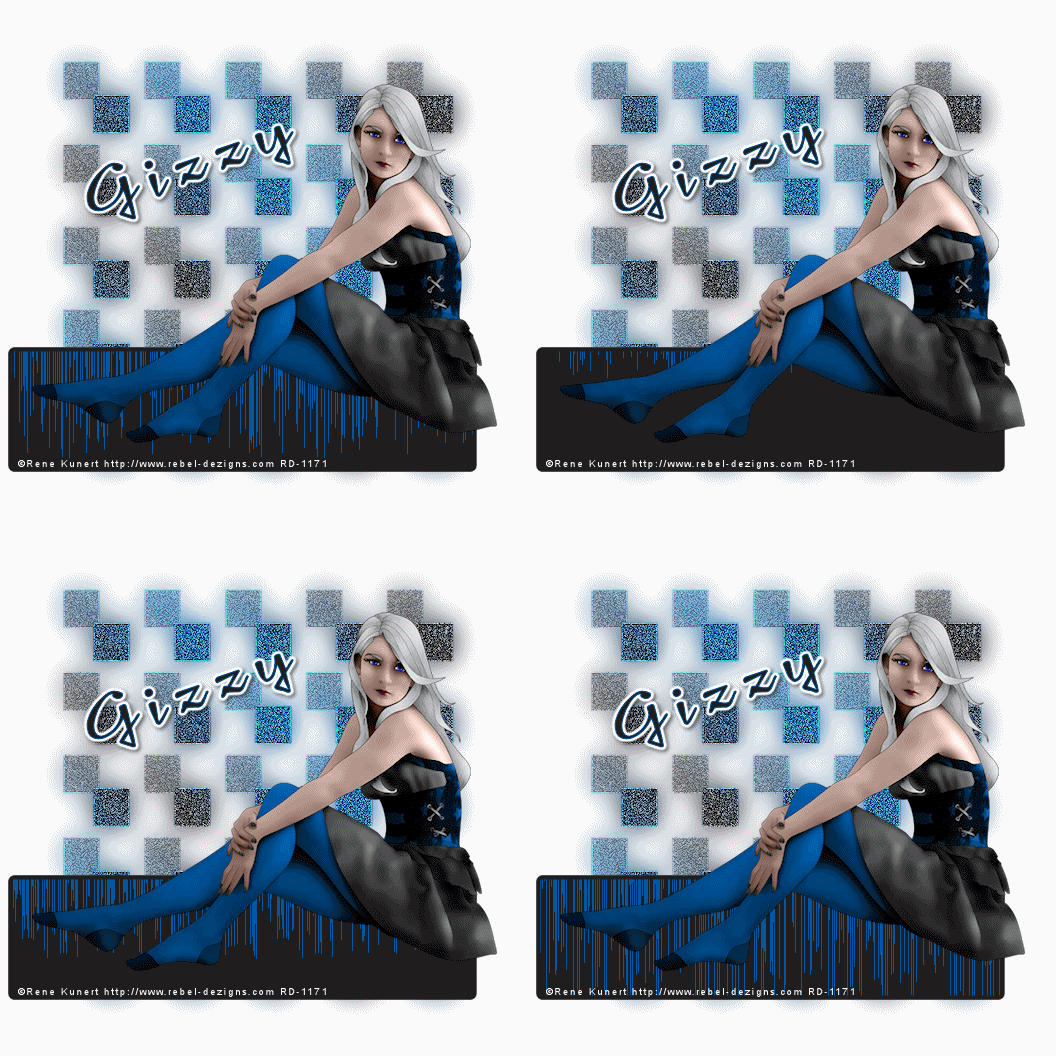
Audio Girl
This tutorial was written
by Sarah Fiack on
March 5, 2012
Any resemblance to another
tutorial is purely coincidental.
For this tutorial, I’m using a
tube by Rene Kunert
The tube is FTU now &
available here
Supplies:
Tube of choice
Vixmask333
Blog
Animation Shop
Plugins
Filters Unlimited 2.0 Pattern Generators
This tutorial is animated.
Please click here to view the animation.
Open a 600x600 white
new image.
Open up your tube of choice.
Copy & paste your tube
as a new layer. If needed,
resize 88%.
I resized the tube I am using.
Now select your rectangle shape tool.
Width 5 Fill is null & Stroke a dark color
from your tube.
Draw out a nice sized rectangle.
Convert to raster.
Move this layer under your tube.
You want the tube to appear
to be on top of part of the rectangle.
Now take your magic wand &
select inside the shape.
Selections modify expand by 2.
Add a new raster layer.
Fill with a color of choice from tube.
Select none.
Move the layer under the rectangle
frame layer.
On your bottom layer,
add a new raster layer.
Fill with a gradient of your two colors.
I used settings Linear
angle 45 repeats 4
Apply Vixmask333
Merge group.
Duplicate the mask layer once.
On the bottom mask layer,
adjust blur gauassian blur 15.
On the top mask layer,
Effects -edges -enhance
Adjust add noise
uniform 25
Effects -edges -enhance
for a 2nd time.
Resize all layers 88%.
Add copyright information to
your tag.
Now make sure you are on the
fill layer of the rectangle.
Apply the plugin
Filters Unlimited 2.0 Pattern Generators
Default settings.
If you don't wish to animate, then
save your tag at this moment.
To animate please continue.
Copy merged & paste as new animation
into Animation Shop.
Now go back to psp, and undo the plugin.
Select the plugin again & click on randomize once.
Copy merged & paste after current frame.
Repeat this for a total of 4 frames in AS.
Select all frames in AS.
Change your frame properties to 20 or as wanted.
If happy, then save tag.
Thanks so much for trying my tutorial.
Thursday, March 1, 2012

Delicate Rose
This tutorial was written
by Sarah Fiack on
March 1,2012
Any resemblance to another
tutorial is purely coincidental.
For this tutorial, I’m using a
tube by Mitzi Sato-Wiuff.
You can purchase the tube at
PSPTUBESTOP
Supplies:
Tube of choice
Scrap of choice.
I’m using one by designs by sarah
called Sweet Vintage
It is available at Pimp My Tags
with Scraps
Here
VixMask 273
Here
Open a 600x600 new image.
Open your tube &
scrap supplies.
Open a frame of choice.
Resize 75%
Rotate free rotate left 90.
Paste as a new layer.
Using your selection tool,
draw out selection around
the center of your frame.
Paste a paper of choice
as a new layer.
Selections invert & press delete.
Select none.
Move the paper layer
underneath the frame layer.
Add a drop shadow to
the frame.
2,2,50,5 Black.
Resize your main tube 78% & 95%.
Paste as a new layer.
Position as wanted on the frame.
Open a vine branch.
Resize 60%
Paste along one side of the frame.
Duplicate the vine once & flip.
Open a lace trim.
Resize 70% Rotate Free rotate 90
Paste on the bottom of the tag.
Position along one side of the frame.
Duplicate once & mirror.
Open a single flower element.
Resize 60% & 80%.
Paste on two corners of the frame.
Open a long curled ribbon.
Resize 80%
Rotate Free rotate 90
Paste this layer under the two single flowers.
Open a pearl necklace element.
Resize 50%
Paste near the bottom of your tube.
Arrange the layer to be just under the tube
in your layer palette.
Paste a 2nd scrap paper of choice
on the bottom layer of your tag.
Apply VixMask 273.
Merge group
Resize the mask layer 105.
Add wordart or text of choice
to your tag.
I added the words
Delicate Rose.
Add a drop shadow to the text.
Merge layers visible.
Resize 88%
Add copyright info & name.
Save as png.
Thanks for trying my tutorial.

Firedancer
This tutorial was written
by Sarah Fiack on
March 1,2012
Any resemblance to another
tutorial is purely coincidental.
For this tutorial, I’m using a
tube by Rene Kunert.
This tube is a Limited Edition
The tube is now FTU &
available here.
Supplies:
Tube of choice
Scrap of choice.
I’m using one by designs by sarah
called Burnin for you
It is available at Pimp My Tags
with Scraps
Here
Open a 600x600 new image.
Open up your tube and
scrap supplies.
Copy & paste your tube
onto your new image.
Open a frame of choice.
I am using a multi square frame.
Resize 85%.
Rotate Free rotate left 90.
Paste the frame on the bottom
layer behind your tube.
Move to the right slightly
so it appears to be coming
from behind your tube.
Using your magic wand
& holding the shift button down,
Click inside each part of the frame.
Selections modify expand by 5.
Paste a scrap paper of choice.
Selections invert & press delete.
Select none.
Move the paper layer under the frame layer.
Add a drop shadow to the frame & tube.
2,2,50,5 Black
Open a flame element.
Resize 90%
Paste above the frame layer
& behind your tube.
Add the above drop shadow.
On the paper layer,
Adjust - add noise.
Uniform 25
Now merge the 2 frame layers
& the flame layers together.
Duplicate the merged layer & mirror.
This should give you two frames behind
your main tube.
Open a ribbon element.
Resize 85%
Rotate free rotate left 90.
Paste along side of the frames.
Add the above drop shadow.
Open a flame doodle.
Resize 70%.
Rotate free rotate Right 25.
Paste on the bottom layer of
the tag & position as needed.
Duplicate the doodle layer once.
Mirror & flip.
Merge layers visible.
Resize 88%.
Add copyright info & name.
Save as png.
Thanks for trying my tutorial.
Subscribe to:
Posts
(Atom)
Zone Award